
Can a jeweller make a custom engagement ring from a photo?
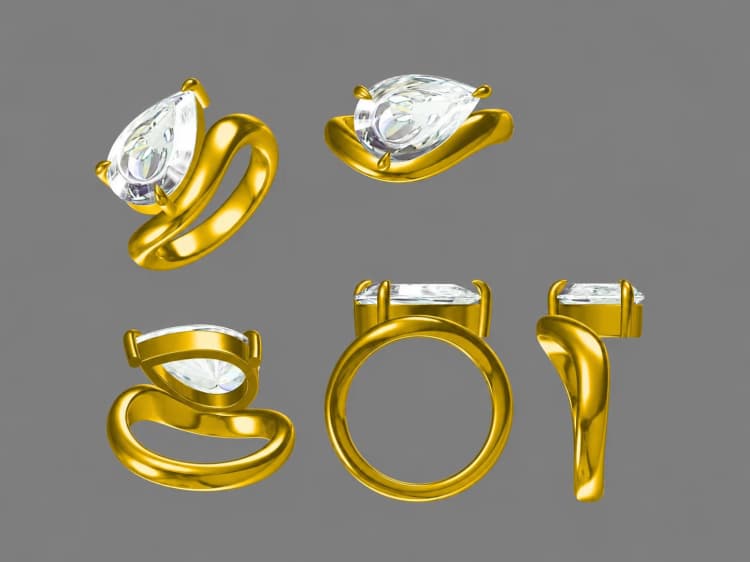
Yes, and at Lily Dia it's one of the most common ways a ring starts. Roughly a third of the enquiries we get begin with a photo, a Pinterest pin, an Instagram screenshot, another jeweller's listing or an AI-generated image someone saved on their phone. Brie, who designs all of our custom rings, takes your picture and turns it into a 3D CAD you can look over from above, side-on and at an angle, and once you sign off on it, our jewellers in Melbourne and Auckland make the ring to those exact measurements.
The finished ring will match the look of your picture and follow the exact dimensions on your CAD. Any difference between the two usually comes down to something in the photo that can't be cast or wouldn't hold up to everyday wear, like claws too fine to grip a diamond safely, and Brie walks you through every one of those tweaks in the CAD before you pay the 50% deposit. Working from a photo costs the same as any other custom ring with us, starting with our A$250 design fee, which comes straight off your deposit when you go ahead.
How do you send a photo, and what should you send with it?
Send whatever pictures you have to hello@lilydiajewellery.com, or drop your details on our contact page and Brie will email you back so you can reply with the photos. If you'd rather talk it through face to face, you can also book a free 15 to 30 minute chat on Zoom or by phone. Brie replies to every message within 24 hours.
Here is what helps most if you have it handy:
| Send | Why it helps |
|---|---|
| Every photo you have of the ring, plus the link if it came from Pinterest, Instagram or a jeweller's site | Extra angles show the details a single front shot hides, and a jeweller's listing usually tells us the carat weight and metal |
| A quick note on what drew you to it | If you love the claws or the band shape more than the whole ring, Brie knows which details to keep exact |
| Your budget, or a rough range | It guides the stone size and lets us tell you straight away whether details like a pavé band fit comfortably |
| The stone: lab-grown diamond or moissanite, the shape, and a rough carat weight or millimetre size if you know it | A photo on its own can't tell us the real size of a stone, and every other measurement in the ring scales around it |
| Your ring size, if you know it | The same stone looks noticeably different on a smaller finger than on a larger one |
| The metal: yellow, white or rose gold, or platinum | Camera filters and warm lighting regularly make white gold look yellow and yellow gold look rose |
Don't stress if you don't have all of that figured out yet. A single screenshot and a rough budget are plenty to start the conversation, and Brie will help you work through the rest.
What changes between your photo and the CAD, and why?
A photo only ever shows a ring from one angle, in one light, on someone else's hand, without a single measurement on it, and an AI image doesn't even have to obey physics. When Brie turns a picture into a real ring, she keeps the look you fell for and rebuilds anything that can't be made or wouldn't survive being worn every day. These are the adjustments that come up most often:
| What the picture shows | What changes in the CAD | Why |
|---|---|---|
| A stone that looks huge in the photo | We scale the setting to the real carat weight or millimetre size you choose | Close-up phone lenses and tiny fingers make diamonds look much bigger than they are, and a photo has no scale |
| Hair-thin claws | At least 0.8mm thick at the base on a 1 carat stone, tapering cleanly at the tip | Claws thinner than that bend easily and risk letting your stone come loose |
| A band thinner than a pencil line | At least 1.8mm wide in gold, 1.6mm in platinum, and 2mm for a pavé band | Paper-thin bands bend out of round with everyday wear, and pavé stones need enough metal either side to stay put |
| Stones floating, overlapping or cutting into the claws | We give every stone a real size, proper spacing and solid metal holding it | AI tools draw what looks pretty on screen without knowing what physically holds a gem in place |
| Only a top-down view of the ring | Brie designs the side profile, setting height and gallery underneath and shows you the side-on view | Most inspiration photos only show the top, yet the side profile decides how high the ring sits and whether a wedding band will sit flush |
| The metal colour in the photo | We build it in the metal you choose, whatever the photo looks like | Instagram filters, warm lighting and photo editing make white gold look yellow and yellow gold look rose |
Your CAD lists the exact stone sizes, band width and metal, and Brie explains every change she made from your photo and why. If you'd rather keep a detail closer to the original picture, she'll tell you honestly what you'd be trading off in everyday strength so you can make the call yourself.
Can an engagement ring from an AI-generated image be made?
Usually yes, with a few practical tweaks. AI image tools are great at getting a look down on screen, and they have no idea that a claw has to be thick enough to grip a diamond, that a band needs solid metal beneath it, or that every tiny stone in a pavé band needs its own seat. The AI pictures people send us most often have hair-thin claws, a band narrower than 1.5mm packed with pavé stones, side stones bleeding into each other, or a centre diamond floating with nothing holding it in place.
Almost all of those designs can be made once Brie rebuilds the structure properly, and the finished ring still captures the look of your picture. Every now and then an AI draws something physically impossible at any thickness, like a twisted band passing straight through itself, and when that happens Brie works out the closest version that can be built for real and shows you how it looks in the CAD.
How close will the finished ring be to your photo?
Very close to the look of your photo, and faithful to the CAD you approve. Before our jewellers touch any gold or set a stone, you'll look over multi-angle CAD renders of your ring, from above, side-on and angled views, with the stone sizes, band width and metal written alongside them, and we'll tweak it as many times as it takes until it feels right. Most people sign off on the first or second version, and the longest of our recent custom rings went to a third round.
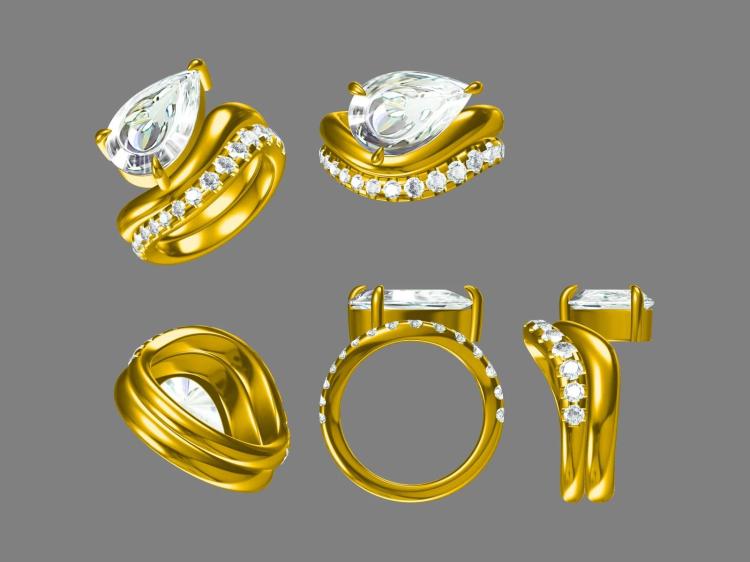
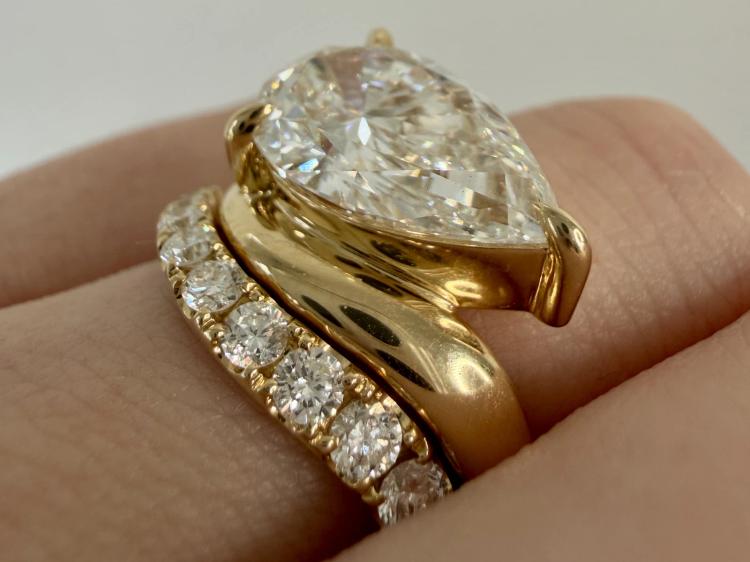
You only pay the 50% deposit once you're happy with the CAD, and our workshop builds the ring directly from that file. If the finished ring ever arrives looking noticeably different from the CAD you approved, that counts as a fault under our returns policy and we put it right. If you're not sure what to look for when your renders arrive, our guide to reading an engagement ring CAD walks through each view and how to send clear feedback.
What does a ring made from a photo cost?
The exact same as any other custom ring at Lily Dia. We don't tack on a surcharge for working off a photo, a Pinterest pin or an AI image. Across the custom rings we've made in 2026, the median price has been A$3,800, and here is what moves the price up or down, based on our pricing checked on 27 October 2026:
| What you choose | What it does to the price |
|---|---|
| The centre stone | Moves the price most. A complete ring with a 1 carat IGI lab-grown diamond starts at A$2,950 in 18k gold, and with moissanite at A$2,210 |
| The setting | Settings start at A$1,260 in 14k gold. Adding a hidden halo is A$300, a half pavé band is A$350 and double eagle-tip claws are A$100 |
| The metal | Stepping up from 14k to 18k gold adds A$300 to a setting, and platinum adds A$50 to A$150 over 18k gold on a complete ring |
| Working from your photo | Nothing extra. It costs the same as any other custom ring |
To get started, you pay a A$250 design fee before we draw your CAD, then the 50% deposit minus that A$250 once you approve the renders, and the other half about 4 to 6 weeks later before your ring ships. Our guide to custom ring deposits walks through a full A$3,800 breakdown and how personal payment plans work.
Can you copy another jeweller's ring?
Yes. Send us photos of the ring from as many angles as you can find, along with the link to its listing if you have it, and Brie will recreate it as closely as the pictures allow in the stone, metal and ring size you want. A jeweller's product page usually lists the carat weight, metal and sometimes the band width, which takes almost all of the guesswork out of getting the proportions right.
You'll compare your CAD side by side against the original photos before you sign off, and we make the ring under the Lily Dia name backed by our lifetime manufacturing warranty. If the original ring has claws or a band thinner than we'd recommend for everyday wear, Brie will flag it when she sends your CAD so you can decide how you want to handle it.
Thanks for reading, Jared and Brie
Frequently asked questions
- Can a jeweller in Australia make an engagement ring from a photo?
- Yes. At Lily Dia, we make custom engagement rings from photos, Pinterest pins, screenshots and AI-generated images all the time. Brie turns your picture into a 3D CAD you check from every angle and approve before anything gets made, and our jewellers in Melbourne and Auckland make the ring to that CAD.
- Can you make a ring from an AI-generated image?
- Yes, usually with a few practical adjustments. AI images often draw claws too thin to grip a stone, bands too fine for everyday wear, or stones with nothing holding them in place. At Lily Dia, Brie keeps the look you love and rebuilds those structural details so the ring lasts, and you see every change in the CAD before you pay the deposit.
- How close will my ring be to the photo?
- Very close in look, and faithful to the CAD you approve. The only things that change are details in the picture that can't be made or wouldn't hold up day to day, like hair-thin claws or a gold band under 1.8mm. Brie walks you through every change in the CAD, and we'll revise it as many times as it takes before you sign off.
- Does a ring made from a photo cost more?
- No. At Lily Dia it costs the same as any other custom ring: a A$250 design fee before we draw the CAD, which comes straight off your 50% deposit, plus the price of your stone, metal and setting. A complete ring with a 1 carat IGI lab-grown diamond starts at A$2,950 in 18k gold.
- What should I send with my photo?
- Send every picture you have of the ring, the link if it came from Pinterest or a jeweller's website, a quick note on what you love about it, your rough budget, the stone and size you have in mind, your ring size and your preferred metal. Email them to hello@lilydiajewellery.com, or drop your details on our contact page and Brie will email you back.
- Can you copy another jeweller's engagement ring?
- Yes. Send Lily Dia photos of the ring and the link to its listing if you have one, and Brie will recreate it as closely as the pictures allow in your chosen stone, metal and ring size. You compare the CAD against the original before approving anything.
- How many CAD revisions do I get?
- As many as it takes. Most Lily Dia custom rings are approved on the first or second CAD, and the longest of our recent custom jobs went to a third version.
Designed with you, made to order
Our jewellers in Melbourne and Auckland make every ring to order for the person wearing it. If this article helped, the collection shows how these choices look on real rings, and you can ask us anything before you decide.
Or ask us a question first